JPEG & SOOC · Ricoh GR
Ricoh GR III & IV: the underrated SOOC JPEG cameras
Fuji gets the film-simulation conversation. Ricoh deserves a place in it. The GR III and GR IV offer the same satisfying idea: choose a look, make it yours, and come home with photos you want to share.
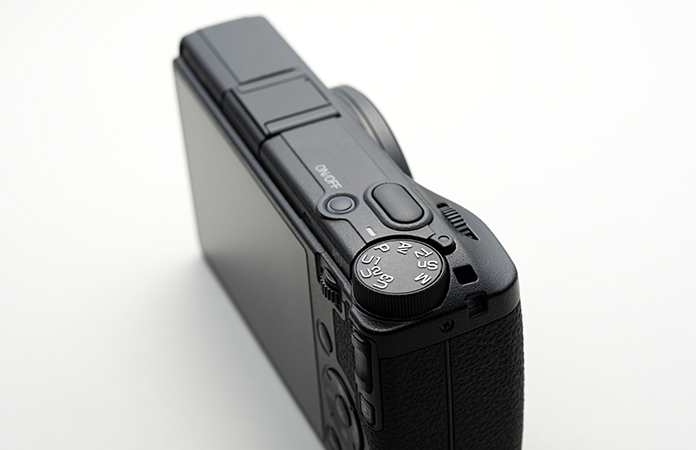
Why Ricoh belongs on your shortlist
A GR is more than a small camera that happens to save JPEGs. Its Image Control system gives you a starting rendering, with adjustments that let you build a repeatable recipe around it. Add white balance, exposure choices and saved settings, and you have a serious alternative to the Fuji recipe workflow.
Comparable experience does not mean identical colors or menus. The appeal is getting a finished photograph at capture—and the freedom to spend your evening doing something other than grading files.
Ricoh has recipes. It calls the foundation Image Control.
A film simulation or Image Control is the starting point. A recipe is the combination of settings around it. That distinction matters: selecting Positive Film is not the same as entering someone’s complete Positive Film recipe.
Ricoh lets you adjust parameters such as saturation, hue, contrast, highlight and shadow contrast, sharpness, clarity and shading. Available adjustments depend on the selected Image Control. White balance and its adjustment are another part of the finished result. Ricoh’s GR III Image Control overview.
This is closely related to how Fujifilm describes building recipes: start with a Film Simulation, then customize image settings. You are deciding how the camera renders the file before pressing the shutter, rather than applying a preset afterward. Fujifilm’s explanation of recipes.
SOOC does not mean unprocessed. The camera is doing the processing. For this guide, it means keeping the color, tone and white balance of the JPEG as captured. Cropping or resizing a sharing copy is a separate choice; moving color sliders afterward is no longer the no-grading workflow described here.
A simple Ricoh GR JPEG setup to start with
For a first daylight outing, try Positive Film at its default adjustments, JPEG at the highest quality and full resolution, sRGB, and Auto white balance with no added shift. Adjust exposure to the scene. This is an editorial learning baseline, not an original tested recipe or a promise to reproduce a particular film.
On the GR III, save the complete setup with User Mode → Save Settings, then use Recall to assign the saved box to a USER dial position. Check the recalled white balance as well as the Image Control. See the GR III manual, printed pages 117–120; use the corresponding manual for the IV.
Take a face, foliage, a bright scene and a shaded scene, then compare the original JPEGs on one familiar display. If you prefer Negative Film, change only the Image Control for the next walk. Save a monochrome setup separately when you are ready to commit to black-and-white capture.
Start with three looks, not thirty recipes
Before changing every slider, spend an outing with the camera’s default rendering for each of these. They give you a reference point for deciding what you actually want to change.
Negative Film: your everyday color starting point
Try this first for a general-purpose color setup. Ricoh added Negative Film to the GR III in firmware 1.70; it is not exclusive to the GR IV. Check firmware on an older used body if it is missing. Ricoh’s firmware feature history.
Photograph a familiar face, foliage, a bright sky and an indoor scene before adjusting it. If you like the overall palette but dislike the warmth indoors, investigate white balance before rebuilding the contrast settings. One change at a time makes the result easier to understand.
Positive Film: an alternative color foundation
Ricoh describes Positive Film as a saturated, positive-film-style finish. Compare it with Negative Film on the same subjects. Look at red clothing, green leaves and skin—not just a colorful storefront—and decide which version you want to live with. GR III operating manual.
The name is a starting point, not a promise to reproduce a particular film stock. A recipe can push it toward your taste without becoming a faithful substitute for a roll of slide film.
Hi-Contrast B&W: commit to a monochrome outing
Use this as an invitation to look for light, shadow and shape. Decide whether the shadow areas still contain the detail you want, then adjust the finish where necessary. A dramatic silhouette can be intentional; losing a face you wanted to see is a different outcome.
A monochrome JPEG does not retain the scene’s color. Choose it deliberately if you are shooting JPEG-only. Keeping a RAW backup during setup gives you flexibility while learning, but it is optional—not a requirement for the finished-JPEG workflow.
There is an established recipe community to explore once you know your preferred base. Ritchie’s Ricoh Recipes Film Collection is one creator’s GR III/IIIx resource. Follow the author’s model and firmware notes, credit recipes you share, and check which resources are freely available or require a paid app tier. We are linking to the creator rather than copying their recipes.
What the GR IV adds to the JPEG experience
The GR III already offers the essential recipe workflow. The GR IV expands it rather than introducing it from scratch.
| Feature | GR III | GR IV |
|---|---|---|
| Film looks | Positive Film; Negative Film with supporting firmware | Both, plus Cinema (Yellow) and Cinema (Green) |
| Grain | Available in supported monochrome controls | Also available in Film and Cinema controls; grain-size adjustment |
| Auto white balance | Check the mode and shift used by your recipe | Adds Warmth Priority and White Priority choices |
| GR WORLD Image Control save/write | Not supported | Supported with firmware 1.04 or later |
Browse used listings
The GR IV’s Cinema options and extra grain controls give you more ingredients for a look at capture. Ricoh also says it tuned the existing Image Controls, so a matching recipe name or identical slider values should not be taken as proof of identical output between generations. GR IV Image Controls and white balance.
The app distinction is specific: GR WORLD can save and write Image Controls for the GR IV, including writing to Custom 1–3. Ricoh explicitly excludes the GR III/IIIx from that function. It does not mean a GR III cannot use manually entered recipes or transfer photographs. Ricoh’s GR WORLD save/write instructions.
For a used buyer, a GR III can make sense if its available looks already suit you. Choose the IV for the extra controls you expect to use, not because the III needs a computer to make an attractive JPEG. This article covers the color cameras; a GR IV Monochrome is a separate choice.
Build a recipe you will actually use
- Choose one base and one lighting situation. Start with Negative Film or Positive Film on a daylight walk. Record the defaults so you can get back to them.
- Set JPEG capture and a useful output size. Keep RAW+JPEG temporarily if you want a learning backup. Once confident, JPEG-only is a valid choice; you do not have to develop the RAW to use the JPEG.
- Choose white balance deliberately. An Auto setting adapts to changing light; a fixed setting can be more consistent within one situation. Neither is right for every scene. If following a recipe, copy its white balance and shift as carefully as its Image Control values.
- Change one ingredient. Try one step of saturation or contrast, or a small white-balance adjustment, then photograph the same subject again. Judge the result on a familiar display before deciding the new setting is an improvement.
- Check exposure before the moment passes. Watch important highlights and the face or subject you want to preserve. A permanent negative exposure-compensation value is not a universal recipe for better color; the light and scene still determine what is needed.
- Save the setup, then recall it and check it. A custom Image Control is not the same thing as a complete shooting setup with white balance and exposure choices. On the GR III, Save Settings stores a setup in a User Mode box, and Recall assigns it to a USER dial position. Save changes again when you want them to become the recalled default. GR III manual, “Saving Frequently Used Settings”. Use the corresponding instructions for your exact body.
- Finish with selection and backup. Transfer the JPEGs, keep the photographs you like and back up the originals. You can share those files without opening a color-grading application.
For your first three saved setups, aim for an everyday color look, an alternative color look and a monochrome look. These are roles to fill, not three prescribed recipes. Shoot with them long enough to recognize when they work before replacing them.
If you keep RAW files, Ricoh also provides in-camera RAW development. That is useful for learning or making a second rendering, but a JPEG developed after the shoot is different from the original SOOC JPEG. For the strict workflow, make your choices before capture.
Why does my Ricoh recipe look different?
- Too warm indoors
- Check the selected white balance and shift before changing the whole recipe. A daylight setup is not a neutralizer for mixed room lighting.
- Different after recall
- Check the complete saved USER setup, not only Custom Image Control. Re-save deliberate changes and test recall again.
- Different on a GR IV
- Ricoh says it tuned the existing Image Controls. Identical slider values are not proof of identical rendering between generations.
- No Negative Film
- Check the exact body and firmware. The GR III gained Negative Film through a firmware update; it is not an IV-only feature.
- App cannot write a recipe
- GR WORLD Image Control save/write supports the GR IV with the required firmware, not the GR III/IIIx. That is separate from entering settings manually or transferring photographs.
For the full capture-to-sharing process, return to the JPEG-only workflow. Feature differences and official references are in the GR III versus IV section.
Should a JPEG shooter choose Ricoh instead of Fuji?
If Fuji’s recipes are what attracted you, Ricoh is worth a serious look. Both let a repeatable collection of camera settings become part of how you photograph. Neither requires you to color-grade every image afterward.
The better choice is the one whose output you like and whose camera you will carry. Try original JPEGs from each system on your own subjects. Familiar recipe names are less useful than seeing whether skin, foliage and mixed lighting look right to you.
Do not buy a GR expecting Fuji Film Simulation names, identical slider behavior or a Fuji recipe copied number for number. The menus and rendering differ. Buy it because its own Image Controls and recipe workflow give you the pictures you want, in a camera that fits your day.
Our view: Ricoh’s SOOC JPEG capability deserves the same serious consideration as its size and street-photography appeal. It is a reason to choose the system in its own right.
Find your Ricoh JPEG camera
Browse current offers, then confirm the exact model, firmware, condition and included equipment. The GR IIIx also belongs in the discussion if you want a different framing option; it is not the same model as the GR III.
Browse used listings
Continue with our full JPEG-only workflow or compare everyday fixed-lens cameras.